
Google Home
Google LLCLifestyle
4.0174.53K Reviews
- Version
- Varies With Device
- Installs
- 1.00B
- Age Rating
- Everyone
Screenshots
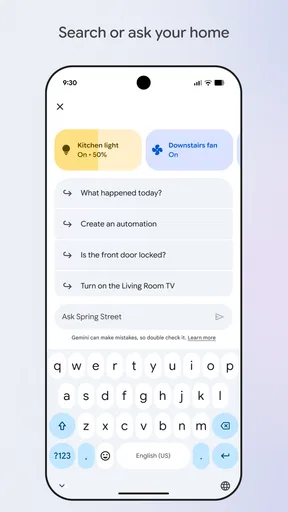
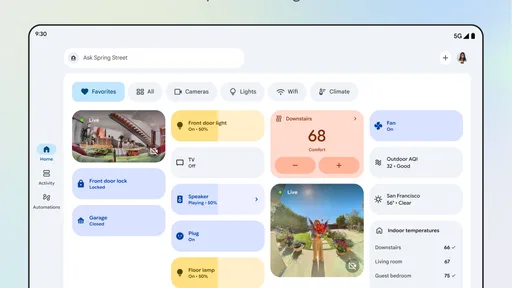
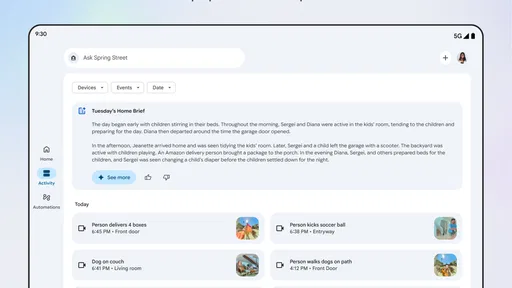
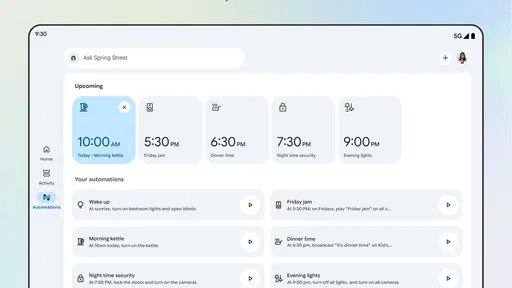
Our Review of Google Home
 Analysis by Appyee
I judge smart-home apps less by the first impressive command than by whether I still reach for them after the novelty wears off. Google Home is most useful when it gives you one dependable place to check and control compatible devices, rather than making every small task feel like a technology project. If your home already includes Nest, Chromecast, or Google Home devices, it can become a practical part of the day; if you do not own compatible equipment, there is much less reason to keep it installed.
What the app is built to do
Google Home is a free lifestyle app from Google LLC, and its job is to bring supported home devices into one control point. It has been available since July 18, 2013, and its audience is substantial: it has more than a billion installs, with an average rating of 4.1 from around 3.6 million ratings. It is rated for Everyone. The app itself costs nothing, though its listing notes optional in-app purchases priced from a few cents to nearly a thousand dollars per item; that range is not a reason to expect the basic app to cost money.
The important distinction is that the app is a control layer, not a shortcut to a complete smart home. What it can do for you depends on which compatible devices you own and have set up. I would start by naming the actual task I want to simplify—such as controlling a living-room screen or checking a connected device—then confirm that my equipment works with Google Home before building plans around it. That small check prevents the familiar disappointment of downloading a hub app and discovering that the one device you care about does not fit the setup.
The first week: satisfying when setup has a purpose
Have you ever wanted to feel like you're living in the future, where your voice commands make things happen instantly? Well, let me tell you about the Google Home app. I've been tinkering with it for a while now, and it's a game-changer for anyone looking to control their smart home devices seamlessly.
A Seamless Setup Experience
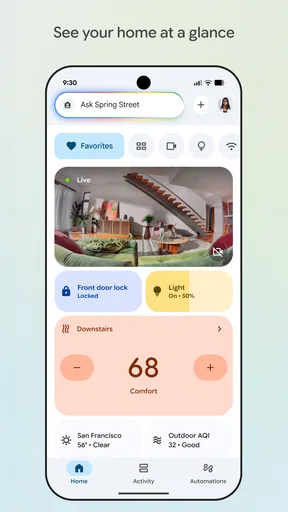
Diving right into the setup, the first thing you'll notice with the Google Home app is how user-friendly it is. It's like the app knows that you’ve got better things to do than spend hours fiddling with settings. When I first opened it, I was pleasantly surprised by the clean interface and intuitive navigation.
The app walks you through connecting all your smart devices step by step. It’s almost like having a tech-savvy friend guiding you through the process. You just have to make sure your devices are compatible, and the app does the rest. It's as simple as plugging in a new device, opening the app, and letting it do its magic. I had my smart bulbs, thermostat, and speakers connected in no time.
The early appeal is strongest when a new connection solves a recurring irritation. In an ordinary evening, for example, I might use the app to find the living-room device I need, make a small adjustment, then stop thinking about the setup and get back to what I was doing. That is a better test than adding devices simply because they appear in a room list. I would connect one or two things I already use, learn where their controls live, and only then decide whether expanding the setup would make daily life easier.
Control at Your Fingertips
Once everything is set up, controlling your devices is a breeze. The app acts as a central hub for your smart home, allowing you to manage everything from one place. Whether you're adjusting the lights, changing the thermostat, or playing your favorite playlist, it’s all right there at your fingertips.
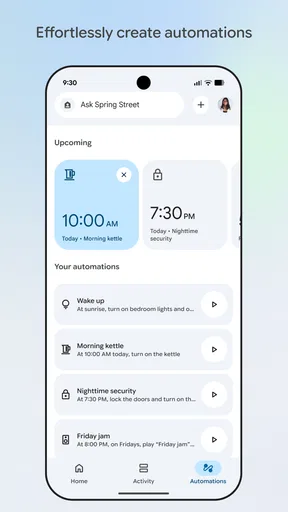
What I love most is how the app anticipates your needs. It suggests routines based on your habits. For instance, I set up a "Good Morning" routine that automatically adjusts the lighting and plays some chill music to start my day. It’s like having a personal assistant who knows just what you need.
Voice Commands: The Future is Now
Now, let’s talk about the exciting part: voice commands. The integration with Google Assistant makes controlling your home feel like you’re living in a sci-fi movie. Just say "Hey Google," and you're off to the races. The voice recognition is top-notch, and it rarely misses a command.
I’ve found it particularly useful when my hands are full, or I’m feeling a bit lazy on the couch. Whether it’s turning off the lights before bed or checking the weather, it’s all a quick voice command away. The responsiveness and accuracy of the Google Assistant make it an indispensable part of the app.
Month-to-month value: habits beat novelty
The app earns a lasting place when it supports a small number of actions you naturally repeat. A morning routine can be useful if the same lights and audio are part of your usual start, but a routine that needs constant adjustment is likely to become clutter. I would keep the setup modest: choose a repeated moment, make the steps easy to remember, and review whether the routine still matches your schedule after your habits change.
There is also a practical difference between using a central app and opening each device maker’s own app. Google Home is more convenient when you want a single place to find compatible devices and handle everyday controls. A manufacturer’s app may be the better choice when you need a device-specific setting or a deeper explanation of its controls. I see the two approaches as complementary rather than assuming the hub replaces every original app.
One useful habit is to treat room organization as a navigation aid, not decoration. Give devices names and places that make sense to the people who will use them, then test whether a family member can find the right control without being coached. Clear organization matters most once the initial setup is no longer fresh: it reduces the chance of tapping the wrong device and makes the app easier to share around a household.
Smart Suggestions and Customization
The app doesn't just stop at being functional; it’s also smart. It learns from your usage patterns and offers suggestions to enhance your experience. It’s like the app evolves with you, which is something I find really cool. Plus, the level of customization is fantastic. You can tailor the app to fit your lifestyle perfectly.
From setting up custom routines to adjusting device settings, you have complete control. The app supports a wide range of devices, which means you can keep expanding your smart home ecosystem without any hitches. The world of IoT is at your fingertips, and the app makes it all so accessible.
Maintenance: keep the setup understandable
A smart-home hub is not entirely hands-off. Devices can be renamed, moved, replaced, or used by different people, and a setup that once made sense can become confusing if no one keeps it tidy. My low-effort approach is to check the room layout when I add or remove a device, remove routines I no longer use, and avoid creating several controls for the same everyday job. These small checks are more useful than endlessly tuning a system that already works.
Another good practice is to keep a simple fallback in mind. If a voice command is inconvenient or does not do what you intended, use the app’s visible controls or the device’s own controls instead of repeatedly rephrasing the same request. Voice is excellent when your hands are occupied, but a screen gives you a clearer view of what you are selecting. Choosing the right method for the moment makes the system feel dependable rather than magical one day and frustrating the next.
For households with more than one person, access and clarity deserve attention before routines become important. Decide who should be able to use the shared controls, and make device names ordinary enough that guests or family members can understand them. The app’s security and privacy controls are worth reviewing as part of setup, not only after a concern arises. I would not treat any connected-home app as a substitute for thinking carefully about who can use the devices and what actions they can trigger.
Where fatigue can set in
The main risk is building a system that demands more attention than it saves. Each new device can mean another setup decision, another name to remember, and another possible point of confusion. Suggestions and customization may be welcome to someone who enjoys adjusting a smart home, but they can feel like noise to someone who only wants a light or speaker to work. I would resist adding equipment for the sake of making the app seem more impressive.
Compatibility is another real boundary. A central hub is only convenient when the devices you care about can be brought into it and behave as expected. Before buying equipment, check its compatibility rather than assuming that a familiar brand or a general smart-home label guarantees a smooth fit. If the important device works best through its own app, or does not connect to your setup, using that app directly may be the simpler choice.
Google Home is also not the right answer for someone who prefers a fully manual home, has little interest in connected devices, or wants a single app to provide every advanced control for every product. In those cases, the extra setup and upkeep can outweigh the benefit of a shared dashboard. I would also avoid relying on a routine for anything that would cause a serious problem if it did not run as expected; keep important tasks easy to verify and use the device’s direct controls when certainty matters.
Security and Privacy: A Key Concern
In today’s world, security and privacy are paramount. The Google Home app takes this seriously by providing robust security settings. You can manage who has access to your devices and set up multiple user profiles with ease. The app also gives you control over your data, allowing you to make informed decisions about your privacy.
"Having control over my smart home devices without worrying about privacy is a huge relief."
It's reassuring to know that while my home is getting smarter, my data is staying secure.
My practical recommendation is to review access as the household changes, rather than leaving old sharing arrangements untouched. If someone no longer needs to control the devices, update access accordingly; if you add a new person, make sure they understand the room names and routines. This is ordinary housekeeping, but it matters more than adding another clever automation. A shared home works best when everyone knows what the controls do and who is expected to manage them.
Who will keep using it?
I would recommend Google Home to people who already use compatible devices and want a convenient overview for repeated tasks, especially when voice control or a simple routine removes a small daily annoyance. It makes less sense for someone who has only one device that is already easy to control, or for a person who dislikes maintaining connected equipment. If you are still deciding whether to build a smart home, begin with a clear need rather than buying devices to justify an app.
When comparing it with the usual alternatives, the choice is less about which app has the most buttons and more about which ecosystem matches the equipment already in your home. A manufacturer’s app can offer a more focused way to manage that maker’s product; Google Home is appealing when you value bringing compatible devices together. If your household already relies on another platform or your devices fit it better, switching just for a unified screen may introduce work without delivering enough benefit.
People often wonder whether the app is useful without a collection of smart devices. In practice, its value is tied to compatible equipment, so I would not install it expecting it to transform an ordinary home on its own. Others may ask whether a routine is worth setting up: it is, if it combines actions you repeat and remains easy to understand, but it is not worth maintaining a complicated sequence you rarely use. And if a control is missing or a device behaves unexpectedly, the sensible first step is to check compatibility and try the device’s own controls rather than assume the hub can solve every product-specific issue.
Final Thoughts
All in all, the Google Home app is a must-have for anyone diving into the smart home ecosystem. Its ease of use, combined with powerful features, makes it stand out in the crowded market of smart home apps. Whether you’re a tech enthusiast or just someone looking to simplify their home life, this app is worth checking out.
From the seamless setup to the intuitive control and robust security features, it’s designed with the user in mind. If you haven't explored the world of smart home technology yet, this app might be just the nudge you need. So go ahead, give it a try, and let your home embrace the future.
My longer-term verdict is more measured: the app deserves space when it reduces friction often enough to become part of your routine, not simply because the first setup feels futuristic. Keep the device list manageable, use routines only where they genuinely help, and be willing to fall back on direct controls when that is clearer. With that approach, Google Home can remain a useful everyday hub; without compatible devices or a recurring need, it is easy to see why it would fade into the background.
Privacy and Permissions
See what permissions an app requests and how it handles your data.
- Identity
- find accounts on the device, add or remove accounts
- Contacts
- find accounts on the device, read your contacts
- Location
- approximate location (network-based), precise location (GPS and network-based)
- Phone
- directly call phone numbers
- Photos/Media/Files
- read the contents of your USB storage, modify or delete the contents of your USB storage
- Storage
- read the contents of your USB storage, modify or delete the contents of your USB storage
- Camera
- take pictures and videos
- Microphone
- record audio
- Wi-Fi connection information
- view Wi-Fi connections
- Other
- view network connections, pair with Bluetooth devices, access Bluetooth settings, change network connectivity, allow Wi-Fi Multicast reception, connect and disconnect from Wi-Fi, measure app storage space, full network access, change your audio settings, run at startup, control vibration, prevent device from sleeping, read Google service configuration
How Google Home Compares
Full ComparisonChoose Google Home for Nest and Chromecast control, SmartThings for Samsung households and broad device support, or Alexa for voice control and a large skills library.
| App | Developer | Rating | Price |
|---|---|---|---|
 Google HomeThis App | Google LLC | 4.0 | Free |
 SmartThings | Samsung Electronics Co., Ltd. | 4.6 | Free |
 Amazon Alexa | Amazon Mobile LLC | 4.1 | Free |
Verdict
Strengths of Google Home
- User-friendly interface for easy navigation.
- Seamless integration with smart devices.
- Customizable routines for automation.
- Voice command support for convenience.
- Multi-user support for personalized settings.
Limitations of Google Home
- Limited compatibility with some third-party devices.
- Occasional connectivity issues.
- Voice recognition can be inconsistent.
- Privacy concerns with data collection.
- Requires strong Wi-Fi for optimal performance.
Other Releases by Google LLC
View All
Google Calendar
Productivity4.6

Google Messages
Communication4.6

Tools4.0

Google TV
Video Players & Editors3.9
Similar Picks in This Category
View All
SmartThings
Samsung Electronics Co., Ltd.4.6

Pinterest4.2

Astrotalk - Talk to Astrologer
Astrology & Horoscope4.7

My Verizon
Verizon Consumer Group4.5

Samsung Wallet (Samsung Pay)
Samsung Electronics Co., Ltd.4.1

Super Slime Simulator: DIY Art
Dramaton4.5
You May Also Like
View All


Frequently Asked Questions
What is Google Home and how does it work?
Google Home is a smart speaker and home assistant powered by Google Assistant. It allows users to control smart home devices, stream music, manage daily tasks, and access information via voice commands. Once set up, it can respond to questions, follow commands, and integrate with various compatible smart devices.
How do I set up my Google Home device?
To set up your Google Home, plug it in and download the Google Home app from the Play Store or App Store. Follow the in-app instructions to connect the device to your Wi-Fi network. You'll need a Google account to complete the setup and customize settings to your preference.
What devices are compatible with Google Home?
Google Home is compatible with a wide range of smart home devices, including lights, thermostats, cameras, and more, from brands like Philips Hue, Nest, and Samsung SmartThings. It also works with Android and iOS smartphones, allowing you to control devices and access features through the Google Home app.
Can I use multiple Google Home devices in my house?
Yes, you can use multiple Google Home devices throughout your home. They can be linked to the same account, allowing for synchronized music playback and seamless control of smart devices. You can also use them for intercom-like communication through the "Broadcast" feature.
Is my data secure with Google Home?
Google Home is designed with privacy in mind, but it's important to be aware of data security. Voice commands are processed and stored by Google, and you can review and delete voice activity in your account settings. Ensure your home network is secure to protect your personal information.
